Shops and showrooms
Show new arrivals, product demonstrations and seasonal offers. Change the playlist without travelling to the screen.

FOTOVENT / YOUR CONTENT, ON YOUR SCREENS
Prepare your photos, graphics and videos. FotoVent puts them on screen: from a connected computer or from the Cloud, with control through your browser.
Try Cloud free ↗10 photos · 1 screen · 100 MB · 1 hour per day. No card.
Already have a connected computer? Find your setup →

ONE CHOICE, THREE WAYS TO WORK
Install the app on Windows or an Apple Silicon Mac and connect your screen. Files stay on the computer and local playback works without Internet. Lifetime requires an online licence check every 30 days.
Try Desktop Free: up to 50 photos and videos per event →You do not need all three. Connect adds remote access to a computer. Cloud is a separate service with online storage and browser playback.
THE CLOUD WORKFLOW
From the portal to the screen's browser, without installing FotoVent Desktop.
Illustrated walkthrough with fictional data. This is not a live session and does not upload files.
Create an event and upload your files. Cloud keeps optimised copies, so keep your originals in your own archive.
Show new arrivals, product demonstrations and seasonal offers. Change the playlist without travelling to the screen.
Prepare your menus as images. With Cloud Pro or Business, schedule breakfast, lunch and evening content separately.
Give entrances, shared spaces and welcome desks their own programmes, announcements and directions.
Keep service times, daily activities and welcome messages current from the control panel.
Display class timetables, practical notices or internal updates where people will see them.
Bring photographers’ images, sponsor content and guest contributions onto the screens during the event.
INSIDE FOTOVENT DESKTOP
The playlist runs on the second screen. On your computer, set the order and timing and control playback.
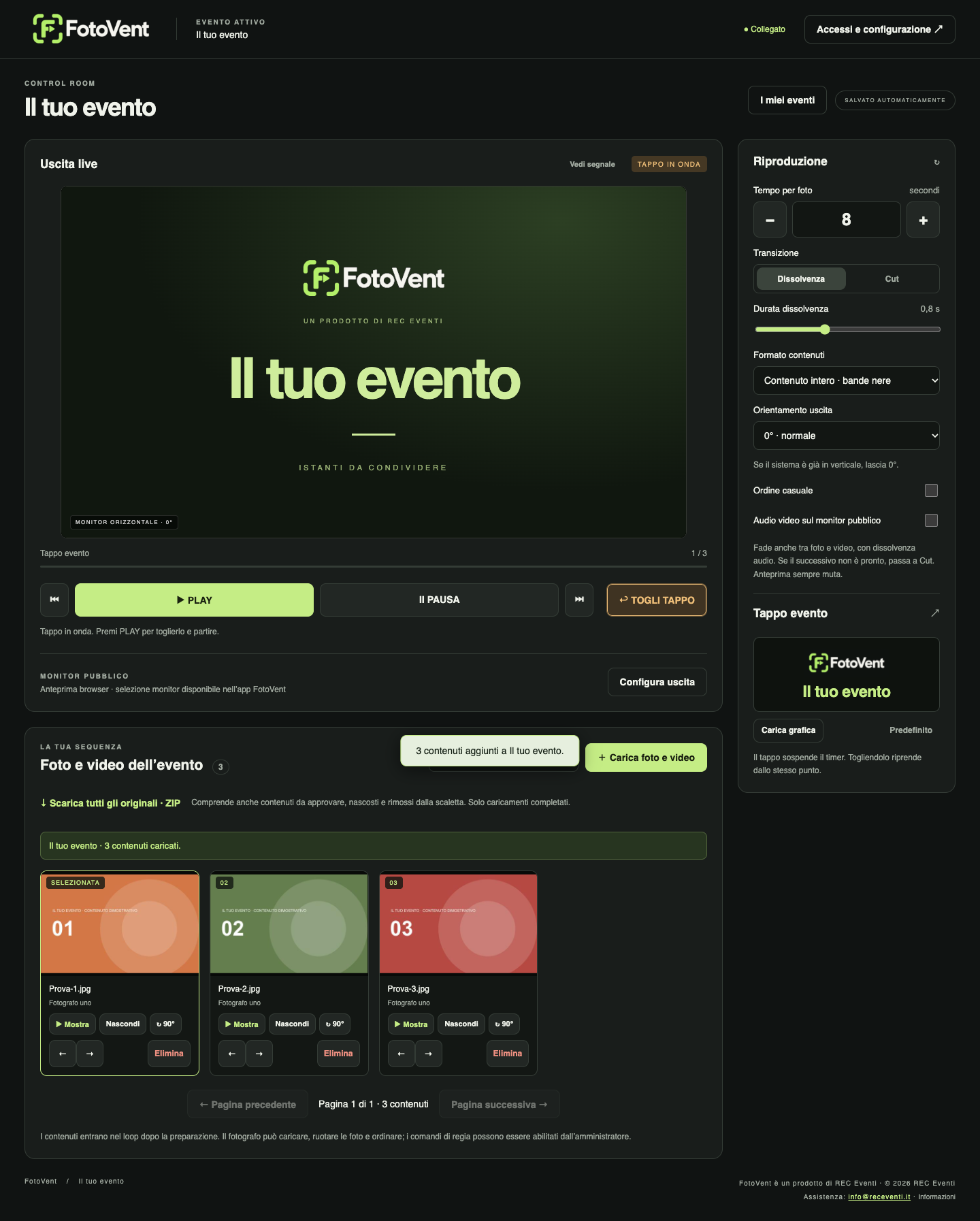
Actual software screenshot with demonstration content; interface shown in Italian.
Explore Desktop →At a wedding, party or company event, guests open a page and upload their photos without an account or access to the gallery. Choose immediate publication or approve each contribution. Desktop Lifetime guest uploads use the event's local Wi-Fi; Connect and Cloud use the Internet. Availability and limits depend on the plan.
Explore guest access →In a shop, café or reception area, organise your graphics and videos into playlists and update them without visiting every screen. Create menus, price lists and notices in your own design tool and export them as images or videos. FotoVent handles playback; it does not include a menu editor or an automatic connection to your till.
FotoVent for digital signage →IN USE / COOK FEST 2026
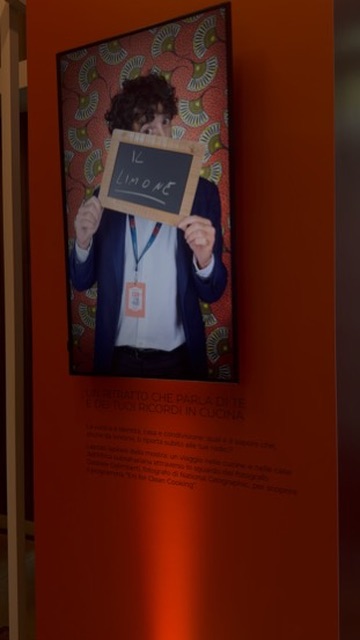
Working with Planet Service at Cook Fest 2026, FotoVent Desktop brought the photographer's uploads to a wall-mounted screen. A practical workflow shaped on site: upload, choose, show. Andrea Matteo Bassi worked with Planet Service on video coordination.
This case documents Desktop in use at the event. It is not a field test of Cloud storage, browser players or Cloud scheduling.
See FotoVent at Cook Fest →BEFORE YOU CHOOSE
Cloud Free lets you try photo uploads, pairing and playback on your own screen. It does not include video, schedules, groups or synchronisation.
This is an example, not an active schedule. Video is available on paid Cloud plans; scheduling requires Pro or Business. Brightness schedules are included in all paid Cloud plans, including Start.
To explore video playback or discuss a schedule for your installation, tell us your screen models, how many you have and what you want to show. We can arrange a demonstration. Contacting us does not activate a licence or extend the trial.
Request a demonstration →Desktop Free lets you try up to 50 photos and videos on your computer. It helps you evaluate Desktop; it does not establish video compatibility in a Cloud browser player.
PRICING AND LICENCES
Up to 50 photos and videos per event on your computer.
Download →Local playback without the Free content limit. One computer at a time; transferable. Excluding VAT. Connect not included.
€9.99/month or €99/year per player, excluding VAT. Remote access, Internet guest uploads and unrestricted local use while active.
Online storage and paired screens. Try with 10 photos free. Paid plans from €19.90/month excluding VAT, with storage and conversion allowances.
FROM THE JOURNAL
Desktop Free plays up to 50 photos and videos per event. Install the app and test uploads, playlists and display output for your premises, office or next event.
Download FotoVent DesktopCLOUD FREE / FREE TRIAL
Sign up, verify your email and activate Cloud Free in the portal. One screen, up to 10 photos in total, 100 MB and one hour of playback per day. No card and no automatic paid renewal. Photos only; no video.
The allowance is shared across the account and resets at midnight in Europe/Rome. Paused photos still count towards playback time.
Paid plans remove the daily playback limit and include video. Scheduling, groups and synchronisation start with Pro. Enterprise is available by quotation.
Sign up and try Cloud free →You can activate Cloud Free after verifying your email. Start, Pro and Business are available to purchase in the portal. “In development” means the interface and features may change and errors are possible. It does not mean a waiting list or free access to paid features.
Test your browser, network and screen before using the service on site. Cloud requires Internet and stores optimised copies, not your originals. Availability and how it works · Purchase terms.